

Alef Login (UAE): Complete MOE Alef Platform Login Guide for Students, Parents, and Teachers
Digital education in the UAE is no longer an experiment—it is national infrastructure. At the center of this transformation is the MOE Alef Platform, an AI-powered learning system officially adopted by the UAE Ministry of Education to personalize education across public schools. Whether you are a student accessing daily lessons, a parent tracking academic progress, or a teacher managing classroom performance, understanding the Alef login process is essential.
This guide goes beyond basic login steps. It explains how Alef works, why it matters in the UAE education system, how to access it securely on desktop and mobile, and what to do when login issues arise—all in one authoritative resource designed for clarity, trust, and long-term relevance.
What Is Alef? Understanding the MOE Alef Platform in the UAE
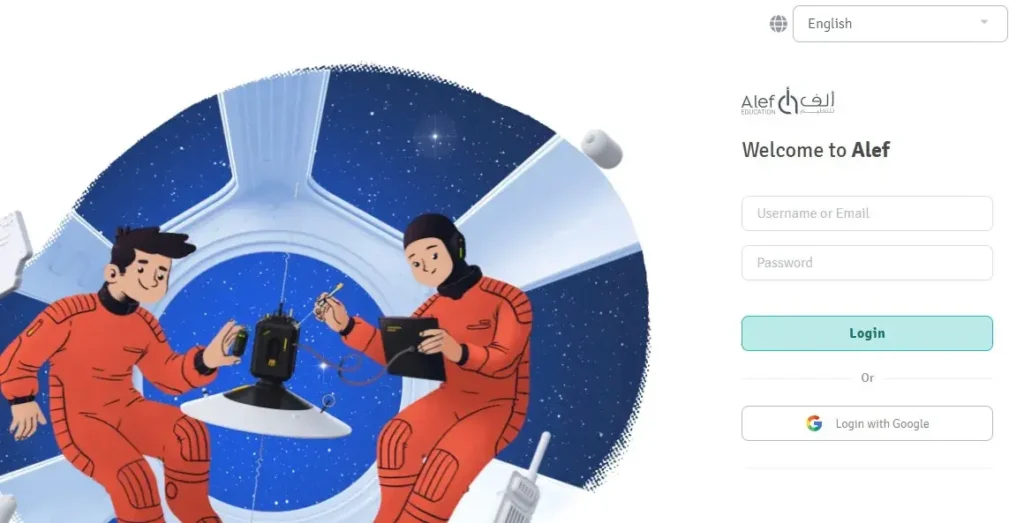
Alef is not just an e-learning portal—it is a government-backed, AI-driven education ecosystem designed to support Kindergarten through Grade 12 students in UAE public schools. Developed in alignment with the Ministry of Education (MOE), Alef integrates curriculum delivery, assessments, analytics, and personalized learning pathways into a single digital environment.
Unlike conventional learning management systems, Alef adapts content dynamically. The platform analyzes student interactions, learning speed, accuracy, and engagement to tailor lessons in real time. This makes Alef especially relevant in the UAE’s diverse classrooms, where students come from varied linguistic, cultural, and academic backgrounds.
In practical terms, Alef serves as:
- A digital classroom for students
- A performance analytics dashboard for teachers
- A progress-monitoring tool for parents
- A scalable education framework for the UAE government
Alef Login (MOE): Official Website and Secure Access
To ensure data security and centralized access, all users must log in through Alef’s official platform.
Official Alef Login URL
Users can access the platform via the official Alef Education website:
This is the only recommended entry point for Alef login to avoid phishing or unofficial mirrors.
How to Log In to Alef: Step-by-Step Guide
The Alef login process is intentionally simple, designed to accommodate students of all ages while maintaining enterprise-level security.
Standard Alef Login Steps
- Visit the official Alef Education website.
- Click on “Login” from the main navigation or electronic services section.
- Enter your username and password (issued by the school or MOE).
- Click the Login button to access your dashboard.
If you are logging in for the first time and do not yet have credentials, you can use the “Sign Up” option if enabled for your role (commonly used by parents).
Alef Login for Mobile Users (Android & iOS)
Recognizing the UAE’s high mobile adoption rate, Alef offers dedicated applications for students, ensuring uninterrupted learning beyond classrooms.
Alef Mobile Apps
- Android: Alef Education App on Google Play Store
- iOS: Alef Student App on Apple App Store
Once installed, students can log in using the same credentials provided by their school. The mobile interface mirrors the desktop experience, including lessons, assignments, assessments, and progress tracking.
Mobile access is particularly valuable for:
- Homework completion
- Revision on the go
- Parents monitoring daily engagement
Key Features That Make Alef Unique in UAE Education
Alef’s impact comes from how deeply it integrates artificial intelligence, curriculum standards, and classroom realities.
AI-Powered Personalization
Alef uses machine learning algorithms to adapt lesson difficulty, pacing, and instructional methods based on individual student performance. This supports both advanced learners and those who need additional reinforcement.
Comprehensive Curriculum Coverage
The platform covers core MOE subjects such as:
- Mathematics
- Science
- Arabic
- English
- Social Studies
Content aligns with UAE national education standards and learning outcomes.
Automated Assessment & Feedback
Exercises and activities are corrected automatically, reducing teacher workload while providing immediate feedback to students—an essential factor in learning retention.
Teacher–Student Interaction
Teachers gain insight into:
- Student strengths and weaknesses
- Time spent on tasks
- Concept mastery levels
This allows targeted intervention rather than one-size-fits-all teaching.
Parent Visibility and Accountability
Parents can monitor academic progress, participation, and performance trends, strengthening the home–school connection.
Why Alef Matters in the UAE’s Education Vision
Alef is part of the UAE’s broader strategy to build a knowledge-based economy. By embedding digital literacy, self-directed learning, and analytical thinking into early education, the platform supports national goals such as:
- Smart government services
- Future-ready workforce development
- Education resilience during disruptions (e.g., remote learning periods)
Unlike many global e-learning platforms that struggle during peak usage, Alef is built with enterprise-grade security and scalability, ensuring consistent performance across UAE public schools.
Common Alef Login Issues and How to Fix Them
Login problems are usually temporary and easy to resolve.
If you cannot log in:
- Double-check your username and password.
- Ensure a stable internet connection.
- Clear browser cache and cookies.
- Try a different browser or device.
- Use the “Forgot Username or Password” option on the login page.
If issues persist, contact your school administration or Alef support through official MOE channels.
Alef Login FAQs
What is Alef used for in UAE schools?
Alef is used as a digital learning and assessment platform in UAE public schools, supporting students, teachers, and parents with AI-powered educational tools.
Who provides Alef login credentials?
Login credentials are typically issued by the school or the Ministry of Education.
What should I do if I forget my Alef password?
Use the “Forgot Username or Password” option on the login page. A reset link will be sent to your registered email or mobile number.
Can parents access Alef?
Yes. Parents can create a parent account and link it to their child’s profile to monitor academic progress.
Is Alef available on mobile devices?
Yes. Alef offers official apps for both Android and iOS devices.
Is Alef only for students?
No. Alef is designed for students, teachers, school administrators, and parents.
Final Thought
Alef is not just a login portal—it is a cornerstone of how education functions in the UAE today. Understanding how to access and use the Alef platform empowers students, supports teachers, and gives parents real visibility into learning outcomes. As digital education continues to evolve, Alef stands as a practical example of how technology and policy can work together to shape the future of learning in the Emirates.
For more verified, locally grounded guides on UAE digital services, education, and daily life, TheDubaiWeb.com remains your trusted reference point.

- How Al Maktoum International Airport Will Become the Biggest Airport in the World: Complete 2026 Guide - July 27, 2026
- Al Mahatta Park Sharjah Area Guide 2026: Location, History, Timings & Things to Do - July 20, 2026
- UAE to India Travel Rules 2026: Air Suvidha, e-Arrival Card, and Gold Limits Explained - July 15, 2026