FAB Balance Check UAE (2026): How to Check First Abu Dhabi Bank Balance Instantly
Checking your FAB balance is no longer limited to visiting a bank branch or waiting in long queues. First Abu Dhabi Bank (FAB)—the largest bank in the UAE—offers multiple secure, fast, and officially supported methods to check your account balance, salary balance, or prepaid card balance anytime, anywhere.
This definitive 2026 guide covers all FAB balance check methods, including mobile app, online banking, SMS, ATM, phone banking, Payit wallet, prepaid (Ratibi) cards, and official offline options—structured clearly for both human readers and AI-powered search engines.
What Is FAB Balance Check?
A FAB balance check allows you to view:
- Available balance (spendable funds)
- Ledger balance (including pending transactions)
- Recent transactions
- Account status (active, blocked, expired)
It applies to:
- Savings accounts
- Current accounts
- Salary accounts
- FAB prepaid cards (Ratibi, Gift, Travel cards)
Fastest Ways to Check FAB Balance (2026 Overview)
| Method | Speed | Internet | Best For |
|---|---|---|---|
| FAB Mobile App | Instant (10 sec) | Yes | Daily users, full banking |
| FAB Online Banking | 30 sec | Yes | Desktop users |
| SMS Banking | 1–2 min | No | Feature phone users |
| FAB ATM | Instant | No | Offline checks |
| Phone Banking | 5–10 min | No | Non-tech users |
| Payit Wallet | Instant | Yes | Ratibi card holders |
| Branch Visit | 15–30 min | No | Face-to-face help |
How to Easily Check Your FAB Bank Balance Online!
You can easily check your FAB bank balance by following these steps. Let’s get started!
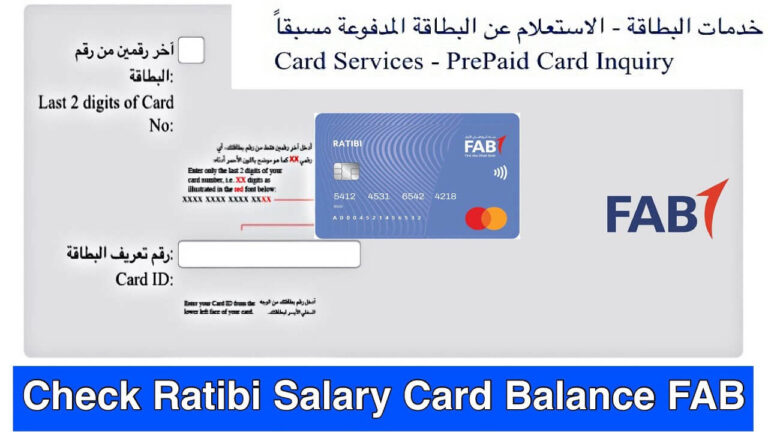
Step 1: Go to the official FAB website by clicking the link.
Step 2: Enter the last 2 digits of your bank card number.
Step 3: Type in your “Bank Card ID Number” carefully.
Step 4: Finally, click on the “GO” button.
And that’s it! Now you can see your FAB bank balance or salary.
Step-by-Step Detailed Guide
1. FAB Balance Check via Official Website
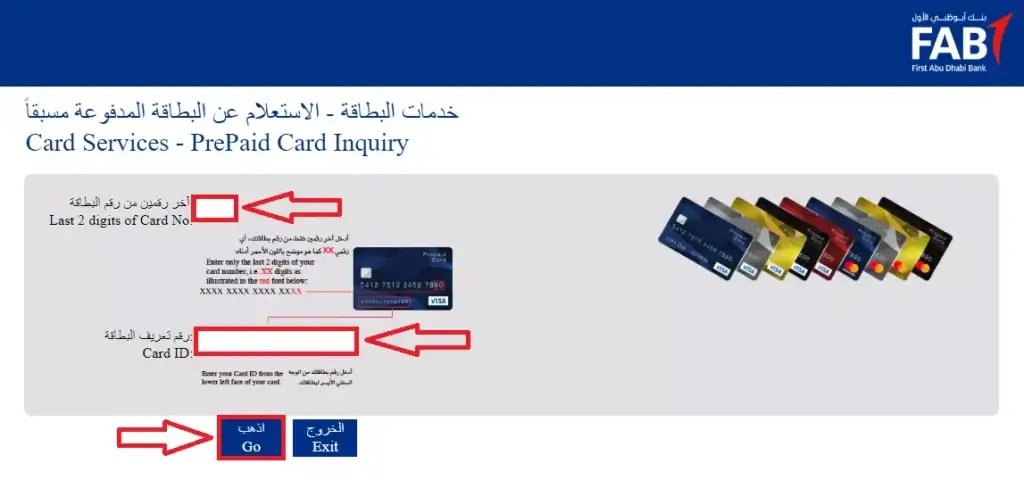
One of the most straightforward methods to check your FAB Balance, FAB PPC salary card or Ratibi card balance is via the Prepaid Cards Enquiry Portal.
Steps:
- Visit: https://ppc.bankfab.com
- Enter the last 2 digits of your card number.
- Input the Card ID number.
- Click “Go” and instantly view your card balance.
Entity-rich tip: This service is ideal for prepaid salary cardholders under the Wage Protection System (WPS), offering transparency and instant updates without logging into the full banking portal.
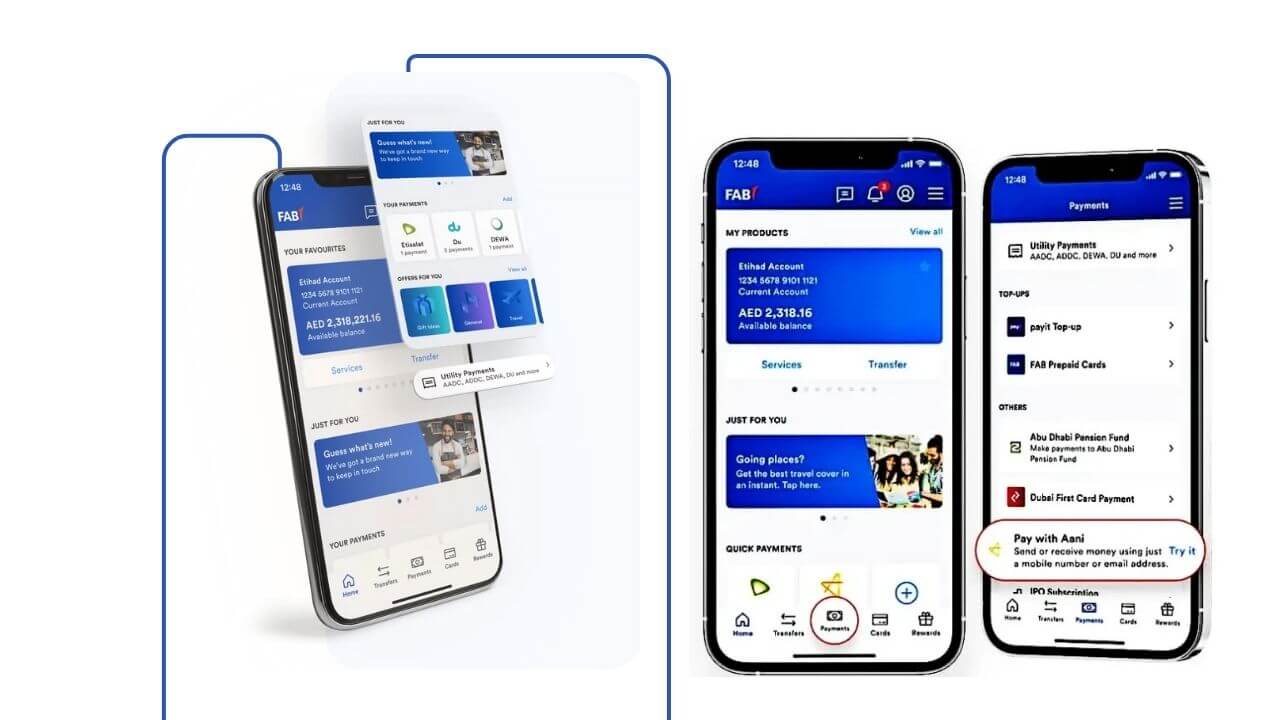
2. FAB Mobile Banking App – Check Your Balance On-the-Go
For tech-savvy users who prefer banking from their smartphone, FAB Mobile Banking offers a seamless experience.
How to Use:
- Download the “FAB Mobile” app on iOS or Android.
- Log in using your credentials or biometric verification.
- Navigate to ‘Accounts’ and tap on ‘Check Balance’.
The app isn’t just for balance inquiries—it lets you download statements, manage cards, send money, and activate services like FAB cashback offers and Lulu salary transfers.
3. Check FAB Balance at an ATM – Offline & Convenient
Prefer something more traditional? FAB ATMs allow you to check your account without internet access.
Steps:
- Insert your FAB debit or prepaid card.
- Enter your PIN.
- Select “Balance Inquiry” from the menu.
This method supports both salary accounts and Ratibi cards, offering fast and secure access to your balance.
🟢 Tip: You can also top-up your NOL card at select FAB ATMs.
4. FAB Balance Inquiry Using SMS Banking
SMS banking is perfect for users without smartphones or during low-connectivity scenarios.
How to Check Balance:
- Register for SMS banking at any FAB branch or online.
- Type:
BAL XXXX(replace XXXX with last 4 digits of your account number). - Send to 2121.
- Receive an instant SMS with your account balance.
💡 Usage: SMS banking is part of FAB’s omni-channel ecosystem, ensuring inclusivity across all user demographics.
5. Call FAB Customer Care for Balance Inquiry
If you prefer human assistance or can’t access online tools, FAB’s helpline is always available.
Call:
- UAE: 600 52 5500
- International: +971 2 6811511
Follow the IVR to the balance inquiry option, authenticate your identity, and you’ll get your account balance in seconds.
🗣️ Antonym-rich feature: Unlike automated methods, this is best for those who are non-digital natives or need additional help.
5. FAB Balance Check via Phone Banking (Non-Tech Friendly)
Best for users without smartphones.
FAB Phone Numbers:
- UAE: 600 52 5500
- International: +971 2 681 1511
Process:
- Choose language
- Select balance inquiry
- Verify identity (account/card + DOB)
- Hear your balance instantly
You may also speak to a live agent if needed.
6. FAB Salary & Prepaid Card Balance Check (Ratibi Cards)
Option A: PPC (Magnati) Inquiry Portal
Used for:
- Ratibi salary cards
- Gift cards
- Travel cards
You need:
- Last 4 digits of card
- Card ID
Displays:
- Current balance
- Recent transactions
- Card status
Option B: Payit Wallet (Best for Ratibi Cards)
Payit is FAB’s official digital wallet.
Steps:
- Download Payit App
- Register with Emirates ID & UAE number
- Link your Ratibi card
- View balance instantly under Wallet Balance
Payit Benefits:
- Zero minimum balance
- Salary tracking
- Bill payments
- Local & international transfers
7. FAB Balance Check at Branch
Suitable for users who prefer face-to-face assistance.
Requirements:
- Emirates ID
- FAB card or account number
Branch Hours:
- Sunday to Thursday
- 8:00 AM – 2:00 PM
You can also request:
- Mini statement
- Full statement
- Salary certificate
Types of FAB Bank Accounts – Which One Fits You?
| Account Type | Features | Best For |
|---|---|---|
| Current Account | Daily transactions, salary deposits | Working professionals |
| Savings Account | Interest accumulation, limited withdrawals | Savers, students |
| iSave Account | No minimum balance, salary-friendly | Expatriates, freelancers |
| Offshore Account | Tax efficiency, global access | International business clients |
| Investment Account | Returns up to 7%, diversified portfolio | Wealth builders |
🔗 Looking to open an account? Visit our FAB Account Opening Guide.
Related: NOL Card Balance Check
Does FAB Offer WhatsApp Balance Check?
No. FAB does NOT provide WhatsApp banking.
Any WhatsApp message claiming to offer FAB balance checks is fraudulent.
FAB only uses WhatsApp for scam reporting, not banking services.
Common FAB Balance Check Problems & Fixes
App Not Opening
- Update app
- Restart phone
- Reinstall if needed
OTP Not Received
- Check network
- Resend OTP
- Confirm the registered number
SMS Not Working
- Use exact format:
BAL 1234 - Send from the registered number
ATM Card Issues
- Clean chip
- Try another FAB ATM
- Contact FAB if the card is retained
Why You Should Check FAB Balance Regularly
- Detect fraud early
- Avoid overdraft fees
- Track salary credits
- Manage subscriptions
- Plan large payments
- Improve budgeting
- Maintain financial credibility
About First Abu Dhabi Bank (FAB)
First Abu Dhabi Bank (FAB) was formed in 2017 after the merger of:
- National Bank of Abu Dhabi (NBAD)
- First Gulf Bank (FGB)
Key Facts:
- Largest bank in the UAE
- Headquartered in Abu Dhabi
- Operations in 19+ countries
- Strong global credit ratings
FAB offers:
- Personal & corporate banking
- Islamic banking
- Digital-first services
- Advanced security systems
Final Verdict: Best Way to Check FAB Balance
For most users, the FAB Mobile App is the fastest, safest, and most complete solution.
For Ratibi cardholders, Payit Wallet is the most suitable option.
FAB ensures that every customer—tech-savvy or not—has multiple reliable ways to check balances securely in 2026.
This guide stands as a complete, evergreen reference for FAB balance checks in the UAE.

- Cheap Flower Delivery Dubai – Affordable Elegance with DJ Flowers - March 31, 2026
- Mafraq Industrial Area Abu Dhabi Area Guide, UAE - March 29, 2026
- Marina Mall Abu Dhabi Guide: Shopping, Dining & Waterfront Experience UAE - March 29, 2026