

12 Best Genspark Alternatives for AI Search, Presentations, and Research Workflows
What Is Genspark?
Genspark is an AI workspace that helps users search, research, create documents, generate slides, build visual content, and work with AI agents.
It has evolved beyond a simple AI search tool. Today, users may consider Genspark for tasks such as:
- AI search
- Deep research
- Slide generation
- Document drafting
- Image generation
- Video creation
- Data work
- Code-related tasks
- Agentic workflows
- Business content creation
This makes Genspark useful for people who want one AI workspace for multiple tasks. However, an all-in-one tool is not always the best choice for every workflow.
Some users may want a tool that is more specialized, easier to edit, better for PowerPoint, stronger for business presentations, more focused on research, or simpler for daily productivity.
That is why many users look for Genspark alternatives.
Why Look for a Genspark Alternative?
Genspark can be useful when you want one workspace for research, content, and creation. But depending on your workflow, another tool may be a better fit.
You may want a Genspark alternative if:
- You need editable PowerPoint-style presentations.
- You want a dedicated AI presentation maker.
- You prefer a stronger AI search or answer engine.
- You need business-ready decks for meetings, reports, or clients.
- You work mainly in Google Slides or PowerPoint.
- You want a simpler research assistant.
- You need branded presentation workflows.
- You create classroom slides or teaching materials.
- You want a more visual storytelling tool.
- You need stronger team collaboration.
- You want an AI workspace that fits a specific use case better.
The best Genspark alternative depends on what you use Genspark for: search, research, slides, documents, visual creation, or workflow automation.
How to Choose the Best Genspark Alternative
Before choosing a tool, start with the job you need to complete.
If you use Genspark mainly for slides, choose an AI presentation maker with strong structure and editable output.
If you use it for research, choose an AI search tool or research assistant with reliable citations and source checking.
If you use it for business decks, choose a tool that supports reports, pitch decks, training slides, and client presentations.
If you use it for visual storytelling, choose a tool with modern design and image support.
If you use it for productivity, choose a workspace that supports notes, documents, collaboration, and repeatable workflows.
If you work in a company, check whether the tool fits your team’s existing systems, such as PowerPoint, Google Slides, Microsoft 365, or Google Workspace.
A good Genspark alternative should not only generate content. It should help you finish the final deliverable more easily.
12 Best Genspark Alternatives
1. Dokie AI
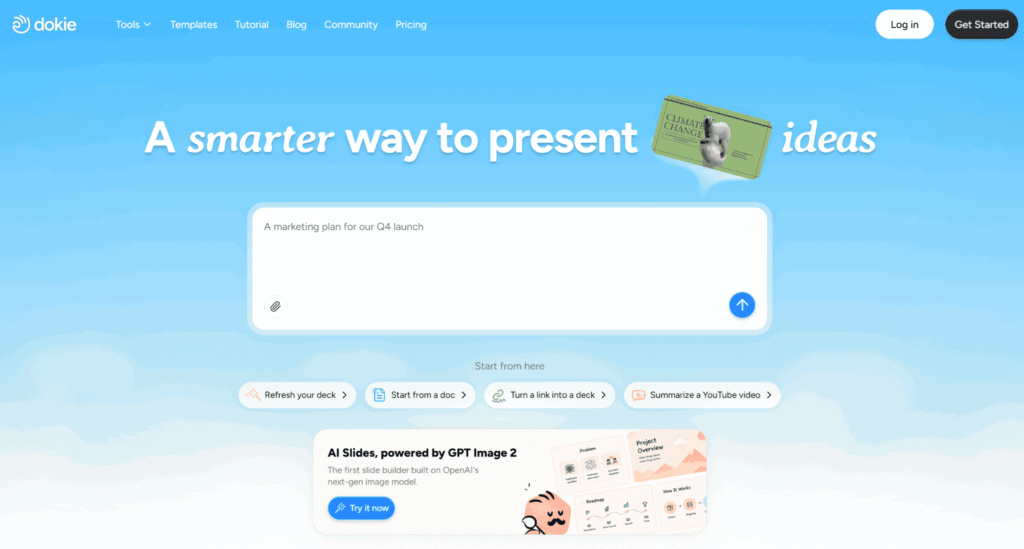
Dokie AI is an AI PPT generator that helps users turn ideas, notes, outlines, documents, URLs, research, and source materials into structured, editable slide decks.
It is a strong Genspark alternative for users who mainly need presentations rather than a broad AI workspace. While Genspark covers many content formats, Dokie AI focuses on helping users create practical slide decks for business, education, training, research, and professional communication.
Dokie AI is useful for:
- Business reports
- Work presentations
- Classroom slides
- Teaching materials
- Student projects
- Research presentations
- Training slides
- Portfolio decks
- Interview presentations
- Marketing decks
- Sales presentations
- Project updates
A key strength of Dokie AI is its content-to-slide workflow. Users can start with rough notes, documents, URLs, research, or outlines and turn them into a clearer presentation structure.
Best for: Business-ready and education-ready presentations, editable PPT workflows, reports, teaching slides, and content-to-slide generation.
Why it is a good Genspark alternative:
Focuses on structured slide creation
Helps turn rough content into editable presentations
Works for business and education use cases
Useful for reports, training decks, research presentations, and portfolios
Better suited for users who need clear slide decks instead of a broad all-in-one workspace
2. Perplexity
Perplexity is one of the strongest Genspark alternatives for AI search and research.
It is designed to help users ask questions, explore topics, and get answers with source links. This makes it useful for research, market analysis, competitive research, news exploration, academic discovery, and general knowledge work.
Compared with Genspark, Perplexity is more focused on AI search and answer generation. If your main goal is finding information, checking sources, and exploring topics quickly, Perplexity may be a better fit.
Best for: AI search, quick research, source-backed answers, and topic exploration.
Pros:
- Strong AI search experience
- Useful source citations
- Good for research and discovery
- Simple question-and-answer workflow
Cons:
- Not primarily a presentation maker
- May require separate tools for slide creation
- Answers still need source checking and human review
3. ChatGPT
ChatGPT is a flexible Genspark alternative for users who need writing, brainstorming, research support, coding help, planning, summarization, and general productivity.
It can help create outlines, rewrite content, summarize documents, draft emails, generate ideas, analyze text, and support many work tasks. With the right workflow, it can also help plan presentations, write slide content, and prepare speaker notes.
Compared with Genspark, ChatGPT is more flexible as a general AI assistant. It may be a better fit if you need a conversational tool that can adapt to many tasks.
Best for: Writing, brainstorming, planning, summarization, coding support, and general AI assistance.
Pros:
- Flexible for many workflows
- Strong writing and editing support
- Useful for brainstorming and planning
- Can support research and presentation outlines
Cons:
- May require other tools for final slide design
- Output quality depends on prompting and source materials
- Users still need to verify facts and data
4. Gamma
Gamma is a popular Genspark alternative for users who want fast AI-generated presentations and modern visual documents.
It can turn prompts into presentations, documents, and shareable web-style pages. Gamma is useful for startup updates, product explainers, internal memos, lightweight reports, and async presentations.
Compared with Genspark, Gamma is more focused on modern presentation storytelling. It may be a better fit if you want a quick, polished, web-native deck rather than a broad workspace.
Best for: Modern visual presentations, startup updates, product explainers, and quick presentation drafts.
Pros:
- Fast AI-generated first drafts
- Clean modern layouts
- Good for storytelling and async sharing
- Easy for non-designers
Cons:
- May need adjustment for traditional PowerPoint workflows
- Output can feel recognizable across decks
- Not always ideal for dense business reports or highly editable PPT workflows
5. Microsoft PowerPoint with Copilot
Microsoft PowerPoint with Copilot is a practical Genspark alternative for corporate users who already work inside Microsoft 365.
Copilot can help users create slides, summarize documents, rewrite content, and improve presentation structure while staying inside the Microsoft ecosystem. For companies where PowerPoint is the standard format, this can be more practical than using an external AI workspace.
Best for: Corporate users, Microsoft 365 teams, and traditional PowerPoint workflows.
Pros:
- Works inside PowerPoint
- Strong fit for enterprise environments
- Good for existing Microsoft workflows
- Can use Microsoft documents as source material
Cons:
- Requires Microsoft 365 and Copilot access
- Design may still need manual polishing
- Best results depend on clear source content
6. Plus AI
Plus AI is a Genspark alternative for users who want AI presentation generation inside Google Slides and PowerPoint.
It helps users generate new presentations, rewrite existing slides, and improve deck structure while staying inside familiar slide editors. This makes it useful for consultants, educators, business teams, and professionals who already work in Google Slides or PowerPoint.
Compared with Genspark, Plus AI is more specialized for presentation workflows. It may be a better fit if your final deliverable is a slide deck that needs native editing.
Best for: Google Slides users, PowerPoint users, consultants, and business teams.
Pros:
- Works with familiar slide tools
- Useful for rewriting and improving existing decks
- Good for business presentations
- Helpful for Google Workspace and PowerPoint users
Cons:
- Less useful if you need broad AI workspace features
- Visual quality depends partly on the selected theme
- May still require manual design refinement
7. Beautiful.ai
Beautiful.ai is a Genspark alternative for users who want polished business presentations with smart design automation.
It uses smart templates and design guardrails to help users create clean, consistent slides without manually adjusting every object. This makes it useful for sales teams, marketing teams, business development teams, and organizations that create recurring decks.
Compared with Genspark, Beautiful.ai is more focused on slide design and brand consistency.
Best for: Brand-consistent business decks and team presentations.
Pros:
- Strong design guardrails
- Professional templates
- Good for business and team use
- Helps maintain visual consistency
Cons:
- Less flexible than manual slide design
- Can feel restrictive for advanced designers
- Not built as a broad research or AI agent workspace
8. Canva
Canva is a flexible Genspark alternative for users who want design, templates, and visual content creation in one platform.
Canva can be used for presentations, social media graphics, posters, reports, infographics, videos, worksheets, and marketing assets. Its AI features can help generate drafts, while its drag-and-drop editor gives users broad creative control.
Compared with Genspark, Canva is stronger for visual design and template-based creative work.
Best for: Visual presentations, marketing slides, classroom decks, and creative design assets.
Pros:
- Large template library
- Easy drag-and-drop editor
- Useful for presentations and other visual content
- Good for beginners, teachers, marketers, and creators
Cons:
- AI slide generation is only one part of the platform
- Some decks can feel template-heavy
- PPT export may require formatting checks
9. Notion AI
Notion AI is a Genspark alternative for users who want AI support inside a knowledge workspace.
It can help users summarize notes, rewrite content, draft documents, organize ideas, and manage knowledge. This makes it useful for teams, students, creators, product managers, and professionals who work heavily with notes, docs, and project information.
Compared with Genspark, Notion AI is less focused on AI search or slide generation and more focused on structured knowledge management.
Best for: Notes, documents, project planning, knowledge management, and team productivity.
Pros:
- Works inside a flexible workspace
- Useful for organizing notes and documents
- Good for teams and personal knowledge management
- Helpful for drafting and summarizing
Cons:
- Not a dedicated presentation maker
- May require other tools for final slides and visual design
- Best for users already working in Notion
10. ClickUp AI
ClickUp AI is a Genspark alternative for teams that need AI inside a project management and productivity platform.
It can help with task summaries, project updates, writing, planning, documentation, and workflow management. This makes it useful for teams that want AI support connected to projects, tasks, docs, and execution.
Compared with Genspark, ClickUp AI is less about broad content generation and more about productivity workflows.
Best for: Project management, team productivity, task summaries, and workflow documentation.
Pros:
- Useful for teams managing projects
- AI support connected to tasks and docs
- Good for planning and execution workflows
- Helps summarize project information
Cons:
- Not focused on presentations
- Can feel too broad if you only need slides or research
- Best for teams already using ClickUp
11. Skywork AI
Skywork AI is a Genspark alternative for users who need research-first content generation.
It is useful for users who want to start from research and turn findings into documents, reports, or presentations. This makes it relevant for business analysis, market research, competitor research, industry reports, and knowledge-heavy content.
Compared with Genspark, Skywork AI may appeal to users who want a research-driven workflow with structured outputs.
Best for: Research reports, business analysis, market research, and research-to-content workflows.
Pros:
- Useful for research-heavy work
- Can support reports and structured content
- Good fit for business and knowledge work
- Helpful when source gathering matters
Cons:
- May still require editing and verification
- Not always the best choice for highly designed presentations
- Final output may need polishing in a separate slide tool
12. Manus
Manus is a Genspark alternative for users interested in AI agent workflows and task execution.
It is designed around the idea of AI agents helping users complete multi-step tasks. This can be useful for research, planning, content workflows, analysis, and other knowledge work where the user wants AI to do more than generate a single answer.
Compared with Genspark, Manus may be more appealing to users who are exploring autonomous or semi-autonomous agent workflows.
Best for: AI agent workflows, task execution, research assistance, and multi-step productivity.
Pros:
- Useful for agent-style workflows
- Can support multi-step tasks
- Good for users exploring AI automation
- May help with research and planning tasks
Cons:
- May be more complex than simple AI tools
- Output still requires review
- Not a dedicated presentation or slide design platform
Best Genspark Alternatives by Use Case
- Best for AI presentations: Dokie AI, Gamma, Plus AI, Beautiful.ai
- Best for editable PPT workflows: Dokie AI, Microsoft PowerPoint with Copilot, Plus AI
- Best for AI search and research: Perplexity, ChatGPT, Skywork AI
- Best for business-ready decks: Dokie AI, Beautiful.ai, Plus AI
- Best for modern visual decks: Gamma, Canva, Beautiful.ai
- Best for Google Slides users: Plus AI, Canva
- Best for classroom slides: Dokie AI, Canva, Gamma
- Best for knowledge management: Notion AI, ChatGPT
- Best for project workflows: ClickUp AI, Notion AI
- Best for agent-style workflows: Manus, Genspark, ChatGPT
- Best for research-to-report workflows: Skywork AI, Perplexity, ChatGPT
- Best for visual content creation: Canva, Gamma
Genspark vs. Alternatives: Which Should You Choose?
- Choose Genspark if you want one AI workspace for search, slides, docs, images, video, code, design, and agent-style tasks.
- Choose Dokie AI if your main goal is creating structured, editable presentations for business, education, training, research, portfolios, and reports.
- Choose Perplexity if you want a focused AI search and answer engine.
- Choose ChatGPT if you need a flexible AI assistant for writing, planning, research, coding, and brainstorming.
- Choose Gamma if you want modern web-style presentations and fast visual drafts.
- Choose PowerPoint with Copilot if your company already works in Microsoft 365.
- Choose Plus AI if you want AI slide generation inside Google Slides or PowerPoint.
- Choose Beautiful.ai if design consistency and branded slides matter most.
- Choose Canva if you need presentations plus broader visual design assets.
- Choose Notion AI if your workflow is built around notes, docs, and team knowledge.
- Choose ClickUp AI if you need AI connected to project management.
- Choose Skywork AI if you need research-first content and report generation.
- Choose Manus if you want to explore agentic workflows and multi-step task execution.
Common Mistakes to Avoid When Choosing a Genspark Alternative
Choosing an all-in-one tool when you need a specialist
All-in-one tools are powerful, but they may not be the best fit for a specific deliverable. If your final output is a slide deck, a dedicated AI presentation maker may be easier to use.
Ignoring final editing workflow
A tool may generate impressive content, but you still need to edit, export, share, and present it. Always check whether the final output fits PowerPoint, Google Slides, PDFs, docs, or your team’s workflow.
Treating AI research as final truth
AI research tools can summarize and cite sources, but users should still verify important claims, especially for business, academic, medical, legal, or financial topics.
Choosing visual style over clarity
Modern design is useful, but a presentation should first be understandable. Choose a tool that helps you communicate clearly.
Using the same tool for every task
Research, slides, project management, visual design, and agent workflows may require different tools. The best Genspark alternative depends on the task.
Forgetting your audience
A deck for executives should be concise. A classroom presentation should be easy to follow. A research report should be evidence-based. Choose a tool that supports your audience’s needs.
Use Dokie AI to Present Your Ideas Clearly
Dokie AI helps users turn ideas, notes, outlines, documents, URLs, research, and source materials into structured, editable slide decks.
For business users, Dokie AI can support reports, project updates, strategy decks, client presentations, sales materials, work portfolios, and training slides. It helps organize information into a clear presentation flow, making the final deck easier to edit and deliver.
For students and teachers, Dokie AI can help create classroom slides, assignment guides, research presentations, teaching materials, student projects, and study decks. It supports education-ready presentations by turning learning content into a more visual and structured format.
If you use Genspark mainly to create slides, Dokie AI can be a practical alternative because it focuses directly on turning content into clear, editable presentations.
FAQs About Genspark Alternatives
What is the best Genspark alternative?
The best Genspark alternative depends on your main use case. Dokie AI is a strong option for structured, editable presentations. Perplexity is useful for AI search. ChatGPT is flexible for writing and planning. Gamma is good for modern visual presentations. Notion AI is helpful for knowledge management.
Why should I use a Genspark alternative?
You may want a Genspark alternative if you need a more specialized tool for presentations, AI search, research, project management, visual design, or document workflows. Genspark is broad, but a focused tool may fit your task better.
Is Dokie AI a good Genspark alternative?
Yes. Dokie AI is a good Genspark alternative if your main goal is to create structured, editable slide decks from ideas, notes, documents, URLs, research, or source materials.
What Genspark alternative is best for AI search?
Perplexity is one of the best Genspark alternatives for AI search because it focuses on source-backed answers and topic exploration. ChatGPT can also support research and summarization, depending on the workflow.
What Genspark alternative is best for presentations?
Dokie AI, Gamma, Plus AI, Beautiful.ai, and PowerPoint with Copilot are strong options for presentations. Dokie AI is especially useful for structured, editable business and education-ready decks.
What Genspark alternative is best for PowerPoint?
Microsoft PowerPoint with Copilot is the most natural choice for Microsoft 365 users. Dokie AI and Plus AI are also useful for users who need editable presentation workflows.
What Genspark alternative is best for students and teachers?
Dokie AI, Canva, Gamma, ChatGPT, and Notion AI can be useful for students and teachers. They can help with classroom slides, teaching materials, research summaries, study notes, and student projects.
Are Genspark alternatives better for business presentations?
Some alternatives may be better for business presentations, especially tools focused on structured decks, editable slides, and brand consistency. Dokie AI, Beautiful.ai, Plus AI, and PowerPoint with Copilot are strong options for business users.
Conclusion
Genspark is a powerful all-in-one AI workspace, but it is not the best fit for every workflow.
If you need structured, editable presentations, Dokie AI is a practical Genspark alternative. If you need AI search, Perplexity is a strong choice. If you need flexible writing and planning support, ChatGPT can help. If you want modern visual presentations, Gamma is worth considering. If your team works in Microsoft 365 or Google Slides, Copilot or Plus AI may fit better.
The best Genspark alternative depends on your final output. Start with the task you need to finish, choose the tool that supports that workflow, and always refine AI-generated content with your own judgment, context, and audience needs.

- Umm Suqeim Dubai Area Guide 2026: Beaches, Villas, Schools and Local Life - August 6, 2026
- Emirates Golf Club Area Guide 2026: Courses, Fees, Location and What to Expect - July 14, 2026
- Al Maktoum International Airport: Your Ultimate Real Estate Investment Guide in Dubai South (2026-2032) - June 22, 2026